Thursday, October 27, 2011

Conditional operator (if operator)

conditional operator (also called "if operator"), if in the form of

(condition ? statements if condition is true : statements if condition is false)

It's equal to:
if(condition){
statements if condition is true;
}else{
statements if condition is false;
}

#include <iostream>

using namespace std;

int main()
{
cout << "conditional operator (if operator)" << endl << endl;

cout << (true ? "It's TRUE" : "It's FALSE") << endl;
cout << (false ? "It's TRUE" : "It's FALSE") << endl;

cout << "3 > 5: " << ((3 > 5) ? "Yes" : "No") << endl;
cout << "'Z' > 'X': " << (('Z' > 'X') ? "Yes" : "No") << endl;

return 0;
}


Conditional operator (if operator)


Wednesday, October 26, 2011

The C++/CX Episode

GoingNative 3: The C++/CX Episode with Marian Luparu


Tuesday, October 25, 2011

Generate random number with srand()

In C/C++, the rand() function computes a sequence of pseudo-random integers in the range 0 to RAND_MAX. This function return a pseudo-random integer, not true.

The srand() function uses the argument as a seed for a new sequence of pseudo-random numbers to be returned by subsequent calls to rand(). If srand() is then called with the same seed value, the sequence of pseudo-random numbers shall be repeated. If rand() is called before any calls to srand have been made, the same sequence shall be generated as when srand() is first called with a seed value of 1.

In this exercise, current date and time, time(0), is used as seek for srand(). Such that the generated pseudo-random numbers will be a more random.

#include <iostream>
#include <cstdlib>

using namespace std;

int main()
{
cout << "Random number generated by rand()" << endl;
for(int i=0; i < 10; i++){
cout << rand() % 100 << " ";
}
cout << endl;

cout << "Random number generated with srand()" << endl;
srand(static_cast<unsigned int>(time(0)));
for(int i=0; i < 10; i++){
cout << rand() % 100 << " ";
}
cout << endl;

return 0;
}


Generate random number with srand()

Friday, October 21, 2011

Comparison of Java and C++

The differences between the C++ and Java programming languages can be traced to their heritage, as they have different design goals.
  • C++ was designed for systems and applications programming, extending the C programming language. To this procedural programming language designed for efficient execution, C++ has added support for statically-typed object-oriented programming, exception handling, scoped resource management, and generic programming, in particular. It also added a standard library which includes generic containers and algorithms.
  • Java was created initially as an interpreter for printing systems but grew to support network computing. Sun Microsystems used it for the basis of their "HotJava" thin client system. It relies on a virtual machine to be secure and highly portable. It is bundled with an extensive library designed to provide a complete abstraction of the underlying platform. Java is a statically-typed object-oriented language that uses a syntax similar to C++, but is not compatible with it. It was designed from scratch with the goal of being easy to use and accessible to a wider audience.


Wikipedia have a article, Comparison of Java and C++, it's list the difference in more details.

It's a sample chapter of the book Java in a Nutshell, describe How Java Differs from C.

Tuesday, October 11, 2011

Exercise of STL stack

#include <iostream>
#include <stack>

using namespace std;

int main()
{
cout << "STL stack exercise" << endl << endl;

stack<int> MyStack;
cout << "init without anything" << endl;
cout <<"MyStack.size(): " << MyStack.size() << endl << endl;

cout << "push something in" << endl;
MyStack.push(1);
MyStack.push(2);
MyStack.push(3);
MyStack.push(4);
cout <<"MyStack.size(): " << MyStack.size() << endl << endl;

cout << "pop all out" << endl;
while (!MyStack.empty())
{
cout << MyStack.top() << endl;
MyStack.pop();
}

cout << endl << endl;

return 0;
}


Exercise of STL stack


Saturday, October 8, 2011

Doubly Linked List

#include <iostream>

using namespace std;

class Node {
private:
Node();
Node(string s, Node* p, Node* n);
string body;
Node* prev;
Node* next;
friend class DoublyLinkedList;
};

Node::Node(){
};

Node::Node(string s, Node* p, Node* n){
body = s;
prev = p;
next = n;
};

class DoublyLinkedList{
public:
DoublyLinkedList();
~DoublyLinkedList();
void AddInFront(string s);
void RemoveInFront();
void AddInBack(string s);
void RemoveInBack();
void ShowAll();
private:
Node* head;
Node* trail;
};

DoublyLinkedList::DoublyLinkedList(){
head = new Node();
trail = new Node();
head->next = trail;
trail->prev = head;
};

DoublyLinkedList::~DoublyLinkedList(){
while (head->next != trail){
RemoveInFront();
}
delete head;
delete trail;
};

void DoublyLinkedList::AddInFront(string s){
Node* nxFrontNode = head->next;
Node* n = new Node(s, head, head->next);
head->next = n;
nxFrontNode->prev = n;
};

void DoublyLinkedList::RemoveInFront(){
if(head->next != trail){
Node* nxFrontNode = head->next;
Node* nnxFrontNode = nxFrontNode->next;
head->next = nnxFrontNode;
nnxFrontNode->prev = head;
delete nxFrontNode;
}
};

void DoublyLinkedList::AddInBack(string s){
Node* nxBackNode = trail->prev;
Node* n = new Node(s, trail->prev, trail);
trail->prev = n;
nxBackNode->next = n;
};

void DoublyLinkedList::RemoveInBack(){
if(trail->prev != head){
Node* nxBackNode = trail->prev;
Node* nnxBackNode = nxBackNode->prev;
trail->prev = nnxBackNode;
nnxBackNode->next = trail;
delete nxBackNode;
}
};

void DoublyLinkedList::ShowAll(){
Node* n = head->next;
while(n != trail){
cout << n -> body << endl;
n = n -> next;
}
}

int main()
{
cout << "- Doubly Linked List exercise -" << endl;

cout << "Create a new DoublyLinkedList: " << endl;
DoublyLinkedList myDoublyLinkedList;
myDoublyLinkedList.ShowAll();
cout << endl;

cout << "Remove nothing in a empty Doubly Linked List: " << endl;
myDoublyLinkedList.RemoveInFront();
myDoublyLinkedList.ShowAll();
cout << endl;

cout << "Insert something in Front: " << endl;
myDoublyLinkedList.AddInFront("ABC");
myDoublyLinkedList.AddInFront("DEFGH");
myDoublyLinkedList.AddInFront("I");
myDoublyLinkedList.AddInFront("JK");
myDoublyLinkedList.AddInFront("LMN");
myDoublyLinkedList.ShowAll();
cout << endl;

cout << "Remove something in Front: " << endl;
myDoublyLinkedList.RemoveInFront();
myDoublyLinkedList.ShowAll();
cout << endl;

cout << "Insert something in Back: " << endl;
myDoublyLinkedList.AddInBack("RST");
myDoublyLinkedList.AddInBack("UVW");
myDoublyLinkedList.AddInBack("XYZ");
myDoublyLinkedList.ShowAll();
cout << endl;

cout << "Remove something in Back: " << endl;
myDoublyLinkedList.RemoveInBack();
myDoublyLinkedList.ShowAll();
cout << endl;

cout << "end!" << endl;
return 0;
}


Doubly Linked List


Monday, October 3, 2011

C++11 Features in Visual C++ 11

There's a new C++ Standard and a new version of Visual C++, and it's time to reveal what features from the former we're implementing in the latter!

Here is a article from MSDN Blogs talking about the new C++11 Features in Visual C++ 11.

Singly Linked List

example:
#include <iostream>

using namespace std;

class Node {
private:
Node(string s, Node* n);
string body;
Node* next;
friend class SinglyLinkedList;
};

Node::Node(string s, Node* n){
body = s;
next = n;
};

class SinglyLinkedList{
public:
SinglyLinkedList();
~SinglyLinkedList();
void AddInFront(string s);
void RemoveInFront();
void ShowAll();
private:
Node* head;
};

SinglyLinkedList::SinglyLinkedList(){
head = NULL;
};

SinglyLinkedList::~SinglyLinkedList(){
while (head != NULL){
RemoveInFront();
}
};

void SinglyLinkedList::AddInFront(string s){
Node* n = new Node(s, head);
head = n;
};

void SinglyLinkedList::RemoveInFront(){
if(head != NULL){
Node* tmp = head;
head = head->next;
delete tmp;
}
};

void SinglyLinkedList::ShowAll(){
Node* n = head;
while(n != NULL){
cout << n -> body << endl;
n = n -> next;
}
}

int main()
{
cout << "- Singly Linked List exercise -" << endl;

cout << "Create a new SinglyLinkedList: " << endl;
SinglyLinkedList mySinglyLinkedList;
mySinglyLinkedList.ShowAll();
cout << endl;

cout << "Remove nothing in a empty Singly Linked List: " << endl;
mySinglyLinkedList.RemoveInFront();
mySinglyLinkedList.ShowAll();
cout << endl;

cout << "Insert something: " << endl;
mySinglyLinkedList.AddInFront("ABC");
mySinglyLinkedList.AddInFront("DEFGH");
mySinglyLinkedList.AddInFront("I");
mySinglyLinkedList.AddInFront("JK");
mySinglyLinkedList.AddInFront("LMN");
mySinglyLinkedList.ShowAll();
cout << endl;

cout << "Remove something: " << endl;
mySinglyLinkedList.RemoveInFront();
mySinglyLinkedList.ShowAll();
cout << endl;

return 0;
}


Singly Linked List


Sort STL vector of C++

example:
#include <iostream>
#include <vector>
#include <cstdlib>
#include <algorithm>

using namespace std;

void showMyVector(const vector<int>& v);

int main()
{
vector<int> myVector;

cout << "Start with nothing" << endl;
showMyVector(myVector);

cout << "Insert something" << endl;
for (int i = 0; i < 10; i++) {
myVector.push_back(rand() % 100);
}
showMyVector(myVector);
cout << endl;

cout << "Sort the vector" << endl;
for (int i = 0; i < 10; i++) {
sort(myVector.begin(), myVector.end());
}
showMyVector(myVector);
cout << endl;

return 0;
}

void showMyVector(const vector<int>& v){
cout << "myVector.empty: " << v.empty() << endl;
cout << "myVector.size(): " << v.size() << endl;
for(unsigned i = 0; i < v.size(); i++){
cout << v[i] << " ";
}
cout << endl;
}


Sort STL vector of C++


Sunday, October 2, 2011

STL vector of C++

example:
#include <iostream>
#include <vector>

using namespace std;

void showMyVector(const vector<int>& v);

int main()
{
vector<int> myVector;

cout << "Start with nothing" << endl;
showMyVector(myVector);

cout << "Insert something" << endl;
myVector.push_back(0);
myVector.push_back(1);
myVector.push_back(2);
myVector.push_back(3);
myVector.push_back(4);
myVector.push_back(5);
myVector.insert(myVector.begin()+2, 9);
myVector.insert(myVector.end()-1, 10);
myVector.pop_back();
showMyVector(myVector);

cout << "Clear" << endl;
myVector.clear();
showMyVector(myVector);

return 0;
}

void showMyVector(const vector<int>& v){
cout << "myVector.empty: " << v.empty() << endl;
cout << "myVector.size(): " << v.size() << endl;
for(unsigned i = 0; i < v.size(); i++){
cout << v[i] << endl;
}
cout << endl;
}


STL vector of C++


Friday, September 30, 2011

Qt, a cross-platform application framework - updated version 1.1.3

Qt
The Qt SDK includes the tools you need to build desktop, embedded and mobile applications with Qt from a single install. This is the recommended way to get started with Qt. The latest SDK has a self updater feature that will keep you up to date as new versions are made available.

To align with the Nokia N9 release, Qt SDK updated version 1.1.3.

website: http://qt.nokia.com/


Wednesday, September 28, 2011

First exercise using Keil uVision 4 for 8051 micro-controller

It's easy to create a 8051 project using Keil 8051 Development Tools, uVision 4. You can also debug the program using the build-in simulator.

- New a uVision Project in uVision 4 IDE.
New a uVision Project

- Select project location and file name.
Select project location and file name

- Select 8051 (all Variants) under Generic in Data base, and click OK.
Select 8051 (all Variants)

- Accept Copy Standard 8051 Startup Code to Project Folder and Add File to Project. The IDE will copy STARTUP.A51 file for you.
Copy Standard 8051 Startup Code to Project Folder and Add File to Project

- Right click th project "Target1" and select Options for Target 'Target1'...
Select Options for Target

- Select Small Memory Model and Small Code Rom Size, and click OK.
Config memory model

- Click File -> New... to creat your main.c

- Type in the program, and save it as main.c.
#include <reg51.h>

void DummyDelay();

void main(void){
char c = 0x00;
while(1){
P1 = c++;
DummyDelay();
}

}

void DummyDelay(){
unsigned char i, j;

for(i = 0; i < 0xFF; i++){
for(j = 0; j < 0xFF; j++){
}
}
}

Edit the code

- Right click Source Group 1 under Target1 in Project, and Add Files to Group 'Source Group 1'...
Add Files to Source Group

- Browse to select the main.c just created.
Add main.c

- Click Project to Build Target.
Build Target

- After finished without Errors. Click Debug and Start/Stop Debug Session.
Start Debug Session

- Click Peripherals -> I/O - Ports -> Port 1 to open the Parallel Port 1 monitor window.
Open Port 1 Monitor
Port 1 Monitor

- Finally click on the Run icon, or F5, to run the program in simulated mode. You can see the Port 1 Bits in Parallel Port 1 monitor change while the program running.
Running in Simulator

- Click Debug and Start/Stop Debug Session, or Ctrl-F5 to exit and back to edit mode.

Tuesday, September 27, 2011

Pointer and Array

In this exercise, an array of int and another array of char are created. On the other hand, a pointer to int and a pointer to char is defined. And then the pointers are assigned to the address of the arrays, and the elements of the array can be accessed by *(pointer + offset).

Pointer and Array

#include <iostream>

using namespace std;

const int LEN = 10;
int A_int[LEN];
int* ptA_int;
char A_char[LEN];
char* ptA_char;

int main()
{
cout << "Pointer and Array" << endl;

int i;
char c;

for (i = 0, c = 'a'; i < LEN; i++, c++){
A_int[i] = i;
A_char[i] = c;
cout << A_int[i] << "/" << A_char[i] << " ";
}
cout << endl;

ptA_int = A_int;
ptA_char = A_char;
for (i = 0; i < LEN; i++){
cout << *(ptA_int + i) << " ";
}
cout << endl;

for (i = 0; i < LEN; i++){
cout << *(ptA_char + i) << " ";
}
cout << endl;

return 0;
}


Keil 8051 Development Tools

The Keil 8051 Development Tools are designed to solve the complex problems facing embedded software developers.
  • When starting a new project, simply select the microcontroller you use from the Device Database and the µVision IDE sets all compiler, assembler, linker, and memory options for you.
  • Numerous example programs are included to help you get started with the most popular embedded 8051 devices.
  • The Keil µVision Debugger accurately simulates on-chip peripherals (I²C, CAN, UART, SPI, Interrupts, I/O Ports, A/D Converter, D/A Converter, and PWM Modules) of your 8051 device. Simulation helps you understand hardware configurations and avoids time wasted on setup problems. Additionally, with simulation, you can write and test applications before target hardware is available.
  • When you are ready to begin testing your software application with target hardware, use the MON51, MON390, MONADI, or FlashMON51 Target Monitors, the ISD51 In-System Debugger, or the ULINK USB-JTAG Adapter to download and test program code on your target system.

Overview of C51 Microcontrollers Development Tool


Download FREE Keil C51 Evaluation Kit
C51 Evaluation Tools Limitations
  • The 8051 compiler, assembler, linker, and debugger are limited to 2 Kbytes of object code. Source code may be of any size.
  • Programs that generate more than 2 Kbytes of object code will not compile, assemble, or link.
  • The debugger supports programs that are 2 Kbytes or smaller.
  • The startup code generated includes LJMPs. Code generated cannot be used in single-chip devices that support 2 Kbytes or less of program space.
  • Programs start at offset 0x0800. Programs generated with the evaluation software may not be programmed into single-chip devices with less than 2 Kbytes of on-chip ROM.
  • No hardware support for multiple DPTR registers is provided.
  • No support for floating-point arithmetic and no support for user libraries is provided.
  • No support for in-line assembly using #pragma ASM.
  • The following components which are present in the PK51 Full Version are not included in the Evaluation Version: Linker for Code Banking, Library Manager, and RTX51 Tiny Real-time Operating System.


Refer: First exercise using Keil uVision 4 for 8051 micro-controller


Monday, September 26, 2011

Implement Insertion sort in C/C++

Insertion sort is a simple sorting algorithm: a comparison sort in which the sorted array (or list) is built one entry at a time. It is much less efficient on large lists than more advanced algorithms such as quicksort, heapsort, or merge sort.

Insertion sort

#include <iostream>
#include <cstdlib>
using namespace std;

void InsertionSort(int* ar, int len);

const int LENGTH = 10;
int data[LENGTH];

int main()
{
//Prepare data
for (int i = 0; i < 10; i++) {
data[i] = rand() % 100;
}

cout << "data before Insertion Sort:" << endl;
for (int i = 0; i < 10; i++)
cout << data[i] << " ";
cout << endl << endl;

InsertionSort(data, LENGTH);

cout << endl << "data before Insertion Sort:" << endl;
for (int i = 0; i < 10; i++)
cout << data[i] << " ";
cout << endl;

return 0;
}

void InsertionSort(int* ar, int len){
int cur, j;

for (int i = 1; i < len; i++) {
cur = ar[i];
j = i - 1;
while ((j >= 0) && (ar[j] > cur)) {
ar[j + 1] = ar[j];
j--;
}
ar[j + 1] = cur;

for (int ii = 0; ii < 10; ii++)
cout << ar[ii] << " ";
cout << endl;
}
}

Sunday, September 25, 2011

Create HelloWorld Windows Form Application, using Visual C++ 2010 Express

Create HelloWorld Windows Form Application, using Visual C++ 2010 Express

- Create New Project using template of Visual C++ Windows Form Application, with Name of "HelloWorld", and click OK.
Create Visual C++ Windows Form Application

- Click on "Toolbox" on right to expand Toolbox, drag a label and button over the Form.
Place components

- Double Click on the button, to generate the code of button1_Click() method. Visual C++ will open the code designer for you.

- Add the code inside button1_Click() method:
 private: System::Void button1_Click(System::Object^  sender, System::EventArgs^  e) {
label1->Text = "Hello World";
}
};

Add code

- Save and Run.
Click on the button, the text on the label will be changed to "Hello World".
Hello World

FREE NetBeans IDE

The NetBeans IDE is an award-winning integrated development environment available for Windows, Mac, Linux, and Solaris. The NetBeans project consists of an open-source IDE and an application platform that enable developers to rapidly create web, enterprise, desktop, and mobile applications using the Java platform, as well as PHP, JavaScript and Ajax, Groovy and Grails, and C/C++.

NetBeans web site: http://netbeans.org/

Thursday, September 22, 2011

Windows Runtime internals: understanding "Hello World"


The Windows Runtime is a key piece of technology used by all Metro style apps in Windows. How exactly does it work though? You too can become a Windows Runtime Expert by taking a deep dive into the internals of the Windows Runtime using not much more than a new project in Visual Studio and a debugger. After this talk, you will understand how A "Hello World" Metro style app uses the Windows Runtime, enabling you to build better apps.

Sunday, September 18, 2011

Virtual Function and Virtual Destructor

Consider the case: There is a base class BASE, and a derived class DERIVED. Both have a member function getInfo(). It's a array of pointer to BASE object. Because object of DERIVED "is a" BASE object also, so it can be pointed by the array.


When we call the getInfo() function of DERIVED object pointed by a pointer to BASE, which function will be called? BASE::getInfo()? or DERIVED::getInfo()? - The answer is BASE::getInfo()!


It's also happen on the destructor, when we delete a DERIVED object pointed by a pointer to BASE, the destructor of BASE will be called.


It's called static binding.


#include <iostream>

using namespace std;

class BASE{
public:
BASE(int x, int y, int z);
~BASE();
void getInfo();
int a;
protected:
int b;
string Im;
private:
int c;
};


BASE::BASE(int x, int y, int z)
:a(x), b(y), c(z){
Im = "Base Class";
}

BASE::~BASE(){
cout << "BASE's destructor! " << Im << endl;
}

void BASE::getInfo(){
cout << "BASE::getInfo()" << " : " << Im << endl;
}

class DERIVED:public BASE{
public:
DERIVED(int x, int y, int z, int w);
~DERIVED();
void getInfo();
private:
int d;
};

DERIVED::DERIVED(int x, int y, int z, int w)
:BASE(x, y, z), d(w){
Im = "Derived Class";
}

DERIVED::~DERIVED(){
cout << "DERIVED's destructor! " << Im << endl;
}

void DERIVED::getInfo(){
cout << "DERIVED::getInfo()" << " : " << Im << endl;

}

int main()
{
BASE* base[2];
base[0] = new BASE(1, 2, 3);
base[1] = new DERIVED(4, 5, 6, 7);
base[0]->getInfo();
base[1]->getInfo();
cout << endl;
cout << "delete base[0]" << endl;
delete base[0];
cout << endl;
cout << "delete base[1]" << endl;
delete base[1];
return 0;
}
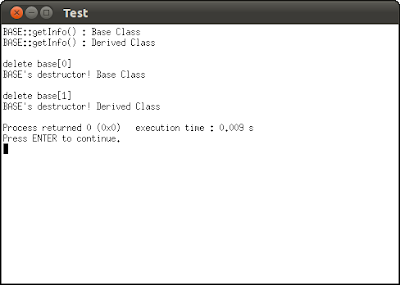


static binding


To solve this problem, we can define both the getInfo() and destructor as virtual, to specify dynamic binding on the functions.


#include <iostream>

using namespace std;

class BASE{
public:
BASE(int x, int y, int z);
virtual ~BASE();
virtual void getInfo();
int a;
protected:
int b;
string Im;
private:
int c;
};


BASE::BASE(int x, int y, int z)
:a(x), b(y), c(z){
Im = "Base Class";
}

BASE::~BASE(){
cout << "BASE's destructor! " << Im << endl;
}

void BASE::getInfo(){
cout << "BASE::getInfo()" << " : " << Im << endl;
}

class DERIVED:public BASE{
public:
DERIVED(int x, int y, int z, int w);
virtual ~DERIVED();
virtual void getInfo();
private:
int d;
};

DERIVED::DERIVED(int x, int y, int z, int w)
:BASE(x, y, z), d(w){
Im = "Derived Class";
}

DERIVED::~DERIVED(){
cout << "DERIVED's destructor! " << Im << endl;
}

void DERIVED::getInfo(){
cout << "DERIVED::getInfo()" << " : " << Im << endl;

}

int main()
{
BASE* base[2];
base[0] = new BASE(1, 2, 3);
base[1] = new DERIVED(4, 5, 6, 7);
base[0]->getInfo();
base[1]->getInfo();
cout << endl;
cout << "delete base[0]" << endl;
delete base[0];
cout << endl;
cout << "delete base[1]" << endl;
delete base[1];
return 0;
}


dynamic binding


Writing modern C++ code - How C++ has evolved over the years


In this talk, Microsoft's C++ architect and chair of the ISO C++ standards committee Herb Sutter will showcase upcoming innovations in Visual C++ that show the Windows Runtime as a core part of native development. Windows 8 comes packed with rich APIs that are all Windows Runtime based, and C++ continues to deliver the tools you need to achieve the power and performance you have come to expect. Join us for a technical session that will serve as an overview of the new C++ programming model for the Windows Runtime and a prerequisite to other C++ sessions.