Showing posts with label tools. Show all posts

Friday, September 30, 2011

Qt, a cross-platform application framework - updated version 1.1.3

Qt
The Qt SDK includes the tools you need to build desktop, embedded and mobile applications with Qt from a single install. This is the recommended way to get started with Qt. The latest SDK has a self updater feature that will keep you up to date as new versions are made available.

To align with the Nokia N9 release, Qt SDK updated version 1.1.3.

website: http://qt.nokia.com/


Wednesday, September 28, 2011

First exercise using Keil uVision 4 for 8051 micro-controller

It's easy to create a 8051 project using Keil 8051 Development Tools, uVision 4. You can also debug the program using the build-in simulator.

- New a uVision Project in uVision 4 IDE.
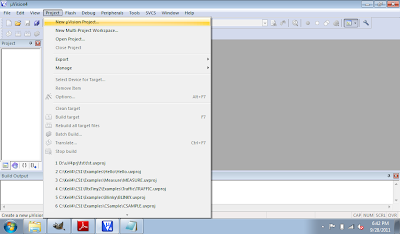
New a uVision Project

- Select project location and file name.
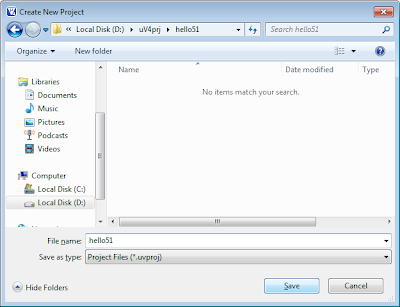
Select project location and file name

- Select 8051 (all Variants) under Generic in Data base, and click OK.
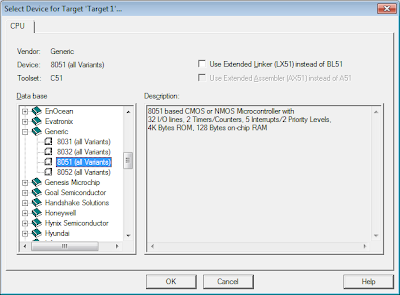
Select 8051 (all Variants)

- Accept Copy Standard 8051 Startup Code to Project Folder and Add File to Project. The IDE will copy STARTUP.A51 file for you.
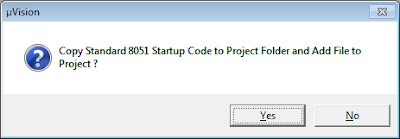
Copy Standard 8051 Startup Code to Project Folder and Add File to Project

- Right click th project "Target1" and select Options for Target 'Target1'...
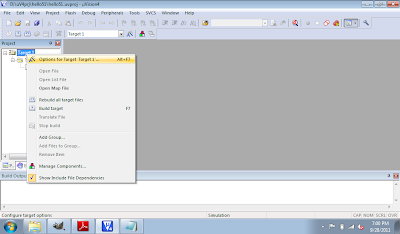
Select Options for Target

- Select Small Memory Model and Small Code Rom Size, and click OK.
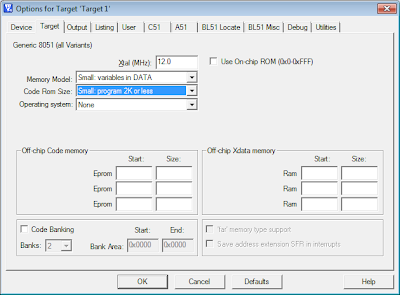
Config memory model

- Click File -> New... to creat your main.c

- Type in the program, and save it as main.c.
#include <reg51.h>

void DummyDelay();

void main(void){
char c = 0x00;
while(1){
P1 = c++;
DummyDelay();
}

}

void DummyDelay(){
unsigned char i, j;

for(i = 0; i < 0xFF; i++){
for(j = 0; j < 0xFF; j++){
}
}
}
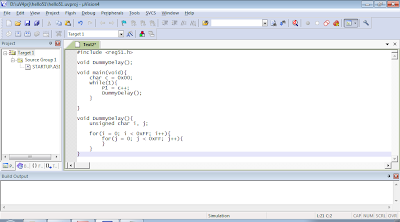
Edit the code

- Right click Source Group 1 under Target1 in Project, and Add Files to Group 'Source Group 1'...
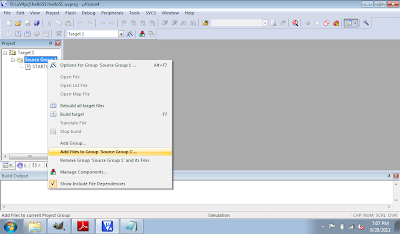
Add Files to Source Group

- Browse to select the main.c just created.
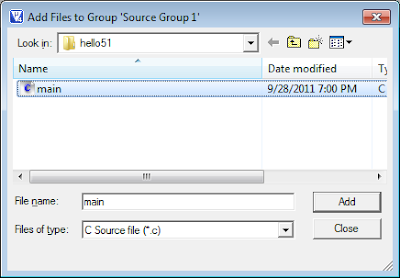
Add main.c

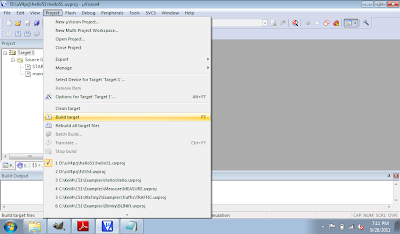
- Click Project to Build Target.
Build Target

- After finished without Errors. Click Debug and Start/Stop Debug Session.
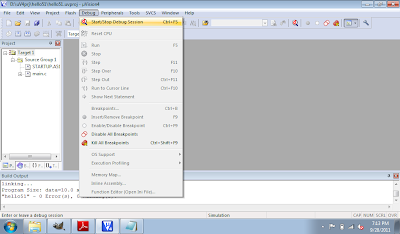
Start Debug Session

- Click Peripherals -> I/O - Ports -> Port 1 to open the Parallel Port 1 monitor window.
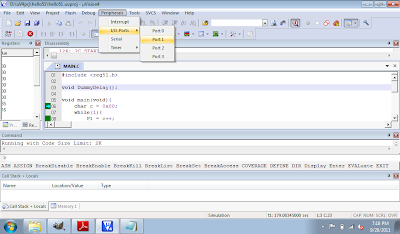
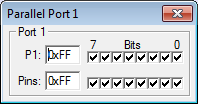
Open Port 1 Monitor
Port 1 Monitor

- Finally click on the Run icon, or F5, to run the program in simulated mode. You can see the Port 1 Bits in Parallel Port 1 monitor change while the program running.
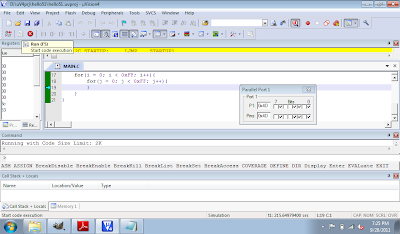
Running in Simulator

- Click Debug and Start/Stop Debug Session, or Ctrl-F5 to exit and back to edit mode.

Tuesday, September 27, 2011

Keil 8051 Development Tools

The Keil 8051 Development Tools are designed to solve the complex problems facing embedded software developers.
  • When starting a new project, simply select the microcontroller you use from the Device Database and the µVision IDE sets all compiler, assembler, linker, and memory options for you.
  • Numerous example programs are included to help you get started with the most popular embedded 8051 devices.
  • The Keil µVision Debugger accurately simulates on-chip peripherals (I²C, CAN, UART, SPI, Interrupts, I/O Ports, A/D Converter, D/A Converter, and PWM Modules) of your 8051 device. Simulation helps you understand hardware configurations and avoids time wasted on setup problems. Additionally, with simulation, you can write and test applications before target hardware is available.
  • When you are ready to begin testing your software application with target hardware, use the MON51, MON390, MONADI, or FlashMON51 Target Monitors, the ISD51 In-System Debugger, or the ULINK USB-JTAG Adapter to download and test program code on your target system.

Overview of C51 Microcontrollers Development Tool


Download FREE Keil C51 Evaluation Kit
C51 Evaluation Tools Limitations
  • The 8051 compiler, assembler, linker, and debugger are limited to 2 Kbytes of object code. Source code may be of any size.
  • Programs that generate more than 2 Kbytes of object code will not compile, assemble, or link.
  • The debugger supports programs that are 2 Kbytes or smaller.
  • The startup code generated includes LJMPs. Code generated cannot be used in single-chip devices that support 2 Kbytes or less of program space.
  • Programs start at offset 0x0800. Programs generated with the evaluation software may not be programmed into single-chip devices with less than 2 Kbytes of on-chip ROM.
  • No hardware support for multiple DPTR registers is provided.
  • No support for floating-point arithmetic and no support for user libraries is provided.
  • No support for in-line assembly using #pragma ASM.
  • The following components which are present in the PK51 Full Version are not included in the Evaluation Version: Linker for Code Banking, Library Manager, and RTX51 Tiny Real-time Operating System.


Refer: First exercise using Keil uVision 4 for 8051 micro-controller


Sunday, September 25, 2011

FREE NetBeans IDE

The NetBeans IDE is an award-winning integrated development environment available for Windows, Mac, Linux, and Solaris. The NetBeans project consists of an open-source IDE and an application platform that enable developers to rapidly create web, enterprise, desktop, and mobile applications using the Java platform, as well as PHP, JavaScript and Ajax, Groovy and Grails, and C/C++.

NetBeans web site: http://netbeans.org/

Sunday, September 18, 2011

Download Microsoft® Visual Studio® 11 Developer Preview

Visual Studio 11 Developer Preview is an integrated development environment that seamlessly spans the entire life cycle of software creation, including architecture, user interface design, code creation, code insight and analysis, code deployment, testing, and validation.


Visual Studio 11 Developer Preview is an integrated development environment that seamlessly spans the entire life cycle of software creation, including architecture, user interface design, code creation, code insight and analysis, code deployment, testing, and validation. This release adds support for the most advanced Microsoft platforms, including the next version of Windows (code-named "Windows 8") and Windows Azure, and enables you to target platforms across devices, services, and the cloud. Integration with Team Foundation Server allows the entire team, from the customer to the developer, to build scalable and high-quality applications to exacting standards and requirements.


Visual Studio 11 Developer Preview is prerelease software and should not be used in production scenarios.


This preview can be installed to run side by side with an existing Visual Studio 2010 installation.


Note: This prerelease software will expire on June 30, 2012. To continue using Visual Studio 11 after that date, you will have to install a later version of the software.


Link: - Microsoft Download Center: Microsoft® Visual Studio® 11 Developer Preview (Web Installer)

Friday, September 16, 2011

Visual Studio 11 Express

Microsoft Visual Studio 11 Express for Windows Developer Preview is a collection of tools that you can use to create, code, debug, localize, package, and deploy a Metro style app. In short, Visual Studio can help you do just about anything you need to do to develop a Metro style app.


know more: First look at Visual Studio 11 Express

Thursday, September 15, 2011

MDK-ARM Microcontroller Development Kit

The MDK-ARM is a complete software development environment for Cortex™-M, Cortex-R4, ARM7™ and ARM9™ processor-based devices. MDK-ARM is specifically designed for microcontroller applications, it is easy to learn and use, yet powerful enough for the most demanding embedded applications.


MDK-ARM is available in four editions: MDK-Lite, MDK-Basic, MDK-Standard, and MDK-Professional. All editions provide a complete C/C++ development environment and MDK-Professional includes extensive middleware libraries. MDK-Lite (32KB) Edition is available for download. It does not require a serial number or license key.

Details: http://www.keil.com/arm/mdk.asp


Wednesday, September 14, 2011

Download Windows Developer Preview and free developer tools

- Windows Developer Preview with developer tools English, 64-bit (x64)
  • 64-bit Windows Developer Preview
  • Windows SDK for Metro style apps
  • Microsoft Visual Studio 11 Express for Windows Developer Preview
  • Microsoft Expression Blend 5 Developer Preview
  • 28 Metro style apps including the BUILD Conference app


- Windows Developer Preview English, 64-bit (x64)


- Windows Developer Preview English, 32-bit (x86)


Details.

Sunday, September 4, 2011

VISUAL C++ 2010 EXPRESS: Free tools to create applications on Windows using Visual C++


Visual C++ 2010 Express is part of the Visual Studio 2010 Express family, a free set of tools that Windows developers at any level can use to create custom applications using basic and expert settings. Visual C++ is a powerful language that is designed to give you deep and detailed control when you build either native Windows (COM+) applications or .NET Framework managed Windows applications.


link:

- Visual C++ 2010 Express

Wednesday, August 31, 2011

Code::Blocks IDE


Code::Blocks is the open-source, cross-platform Integrated Development Environment (IDE). It is based on a self-developed plugin framework allowing unlimited extensibility. Most of its functionality is already provided by plugins. Plugins included in the base package are:

  • Compiler frontend to many free compilers
  • Debugger frontend for GDB (and CDB for windows platforms)
  • Source formatter (based on AStyle)
  • Wizard to create new C++ classes
  • Code-completion / symbols-browser (work in progress)
  • Default MIME handler
  • Wizard to create new Code::Blocks plugins
  • To-do list
  • Extensible wizard based on scripts
  • Autosave (saves your work in the unfortunate case of a crash)


Website


To install Code::Blocks on Ubuntu Linux, simple search "Code::Blocks" in Application -> Ubuntu Software Center. The current available version is Code::Blocks 10.05.

Code::Blocks IDE 10.05 on Ubuntu

Friday, May 27, 2011

HelloWorld using Dev-C++

To create the first "HelloWorld" using Dev-C++:

Click File -> New Project to create a new C++ project using template of Console Application, with name of HelloWorld.
Create a New Project...

Select your target folder when you are asked to do so.

A dummy code will be generate with the code:
system("PAUSE");
return EXIT_SUCCESS;

auto generated code

Just keep it as is. It's used to keep the console window not to close after your application close, such that you can see you output.

Add one line of code to finished your first "Hello World".
cout << "Hello World\n"; insert code

Save your file.

Click Execute -> Compile & Run.
HelloWorld using Dev-C++

Dev-C++: IDE for C/C++ programming language on Windows

Bloodshed Dev-C++ is a full-featured Integrated Development Environment (IDE) for the C/C++ programming language. It uses Mingw port of GCC (GNU Compiler Collection) as it's compiler. Dev-C++ can also be used in combination with Cygwin or any other GCC based compiler.


Features are :


- Support GCC-based compilers

- Integrated debugging (using GDB)

- Project Manager

- Customizable syntax highlighting editor

- Class Browser

- Code Completion

- Function listing

- Profiling support

- Quickly create Windows, console, static libraries and DLLs

- Support of templates for creating your own project types

- Makefile creation

- Edit and compile Resource files

- Tool Manager

- Print support

- Find and replace facilities

- CVS support


http://www.bloodshed.net/devcpp.html