OpenCV (Open Source Computer Vision) is a library of programming functions for real time computer vision.
OpenCV is released under a BSD license, it is free for both academic and commercial use. It has C++, C, Python and soon Java interfaces running on Windows, Linux, Android and Mac. The library has >2500 optimized algorithms (see figure below). It is used around the world, has >2.5M downloads and >40K people in the user group. Uses range from interactive art, to mine inspection, stitching maps on the web on through advanced robotics.
This is a cookbook that shows results obtained on real images with detailed explanations and the relevant screenshots. The recipes contain code accompanied with suitable explanations that will facilitate your learning. If you are a novice C++ programmer who wants to learn how to use the OpenCV library to build computer vision applications, then this cookbook is appropriate for you. It is also suitable for professional software developers wishing to be introduced to the concepts of computer vision programming. It can be used as a companion book in university-level computer vision courses. It constitutes an excellent reference for graduate students and researchers in image processing and computer vision. The book provides a good combination of basic to advanced recipes. Basic knowledge of C++ is required.
Wednesday, June 22, 2011

Saturday, June 11, 2011
Friday, May 27, 2011
Exercise of i++ vs ++i
exercise:

#include <cstdlib>
#include <iostream>

using namespace std;

int main(int argc, char *argv[])
{
  int i;

  cout << "Test on i++ \n";
  i = 0;
  cout << i++ << "\n\n";

  while(i++ <= 10){
        cout << i << "\n";
        }

  cout << "\n";
  cout << "Test on ++i \n";
  i = 0;
  cout << ++i << "\n\n";

  while(++i <= 10){
        cout << i << "\n";
        }

  system("PAUSE");
  return EXIT_SUCCESS;
}

HelloWorld using Dev-C++
To create the first "HelloWorld" using Dev-C++:
Click File -> New Project to create a new C++ project using template of Console Application, with name of HelloWorld.
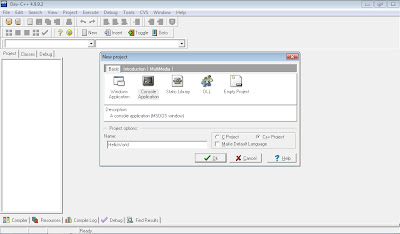
Select your target folder when you are asked to do so.
A dummy code will be generate with the code:
system("PAUSE");
return EXIT_SUCCESS;
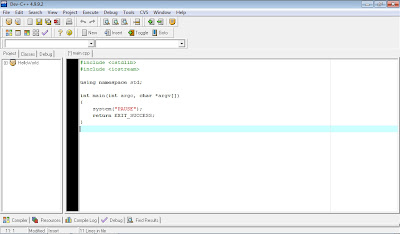
Just keep it as is. It's used to keep the console window not to close after your application close, such that you can see you output.
Add one line of code to finished your first "Hello World".
cout << "Hello World\n";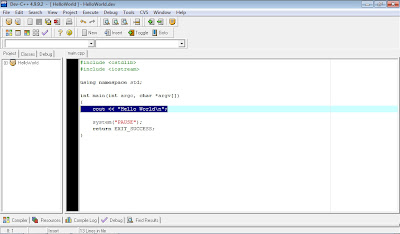
Save your file.
Click Execute -> Compile & Run.
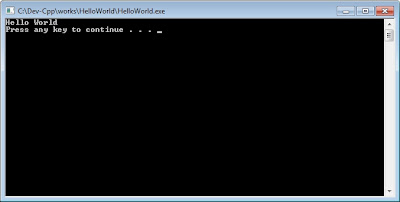
Click File -> New Project to create a new C++ project using template of Console Application, with name of HelloWorld.

Select your target folder when you are asked to do so.
A dummy code will be generate with the code:
system("PAUSE");
return EXIT_SUCCESS;

Just keep it as is. It's used to keep the console window not to close after your application close, such that you can see you output.
Add one line of code to finished your first "Hello World".
cout << "Hello World\n";

Save your file.
Click Execute -> Compile & Run.

Dev-C++: IDE for C/C++ programming language on Windows
Bloodshed Dev-C++ is a full-featured Integrated Development Environment (IDE) for the C/C++ programming language. It uses Mingw port of GCC (GNU Compiler Collection) as it's compiler. Dev-C++ can also be used in combination with Cygwin or any other GCC based compiler.
Features are :
- Support GCC-based compilers
- Integrated debugging (using GDB)
- Project Manager
- Customizable syntax highlighting editor
- Class Browser
- Code Completion
- Function listing
- Profiling support
- Quickly create Windows, console, static libraries and DLLs
- Support of templates for creating your own project types
- Makefile creation
- Edit and compile Resource files
- Tool Manager
- Print support
- Find and replace facilities
- CVS support
http://www.bloodshed.net/devcpp.html
Features are :
- Support GCC-based compilers
- Integrated debugging (using GDB)
- Project Manager
- Customizable syntax highlighting editor
- Class Browser
- Code Completion
- Function listing
- Profiling support
- Quickly create Windows, console, static libraries and DLLs
- Support of templates for creating your own project types
- Makefile creation
- Edit and compile Resource files
- Tool Manager
- Print support
- Find and replace facilities
- CVS support
http://www.bloodshed.net/devcpp.html
Wednesday, May 25, 2011

Subscribe to:
Posts (Atom)